Synchronize video with accelerometer data
Replay camera footage in step with GPS and acceleration data, align it on a shared event, and turn what you see into ground truth for behaviour annotation.
Why video helps
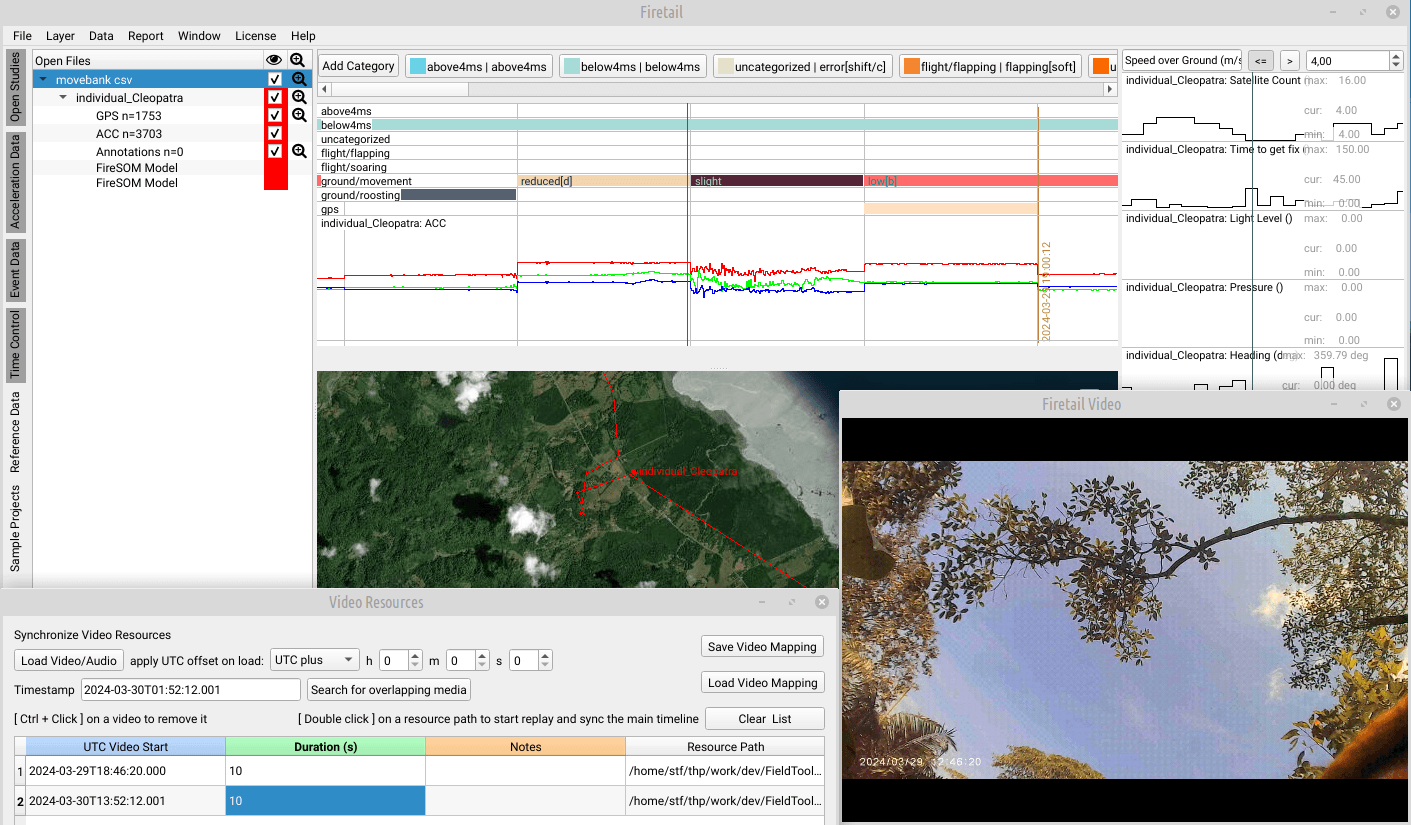
Acceleration patterns are hard to interpret on their own. Footage from camera traps, ground-truth video or animal-borne cameras shows what the animal was actually doing, and Firetail's VideoSync module replays it in the context of the tag's GPS and sensor data. That makes video a powerful way to annotate data and to evaluate predicted behaviour. Images and audio work as well.
How VideoSync works
- Load video or audio and set the offset of its clock to UTC, if needed down to the millisecond. Firetail tries to read the recording time and duration from the files, including EXIF timestamps in JPEG images.
- Double-click a resource to play it: the main timeline jumps to the video's start, and video and data run in sync when the timeline plays in real time.
- Fine-tune the start time with the mouse wheel (Shift, Ctrl or both for steps of 0.2, 1 or 10 seconds) or type an exact timestamp.
- Save the mapping as a JSON file. Several mappings can be loaded and stacked, for example one per animal, and every resource can carry a note.
Replay uses the free mpv player, which you link to Firetail once.
Align video and data on a shared event
A freshly imported video often starts with an unreliable timestamp. The fastest fix is an event you can see in both: a distinct burst in the acceleration data and the same moment in the video.
- Navigate to the event in the data and mark it as Data Event.
- Find the same moment in the video and mark it as Video Event.
- Firetail computes the offset; Shift Selection applies it. From then on, moving through the video moves the data view with it.
One video, several animals
Since Firetail 14, the same video can be added several times with different offsets, for example when one recording shows several tagged animals. Search for overlapping media finds the videos that cover the current point in time and highlights where they overlap.
From footage to ground truth
What you see in the video becomes annotation: mark the behaviour directly in Firetail, or import events from the BORIS video annotation tool (tabular CSV exports from BORIS v7 and v8, including point and range events and modifiers). Compared with an automated classification, these annotations show how reliable it is; see Classify animal behaviour from accelerometer data.
Done in published research
Peer-reviewed studies and preprints that used Firetail for this, from our publication list.
- Ground-truth validation of behavioral classifications from accelerometer data using an integrated GPS-accelerometer-camera device: application to an elusive scavenger
Animal Biotelemetry (2026)
Firetail used for: Video-based ground truth for Self-Organizing Map behaviour classification of king vultures (tailored Firetail modules)
- Classifier architecture and data preprocessing jointly shape accelerometer-based behavioural inference
bioRxiv (2026)
Firetail used for: Synchronising video and acceleration data to train behaviour classifiers
Get Firetail
free downloadGet started with Firetail today! Interactively process high-density data for multi-animal, multi-year projects!
“No risk: request a three-month trial, kickstart your analysis and see your data in an all-new light!”